

#
1. Onboard
Onboard — Partner Store Integration
Connect a partner’s store to Toco through a secure, OAuth-like flow that issues the store credentials used by all partner APIs.
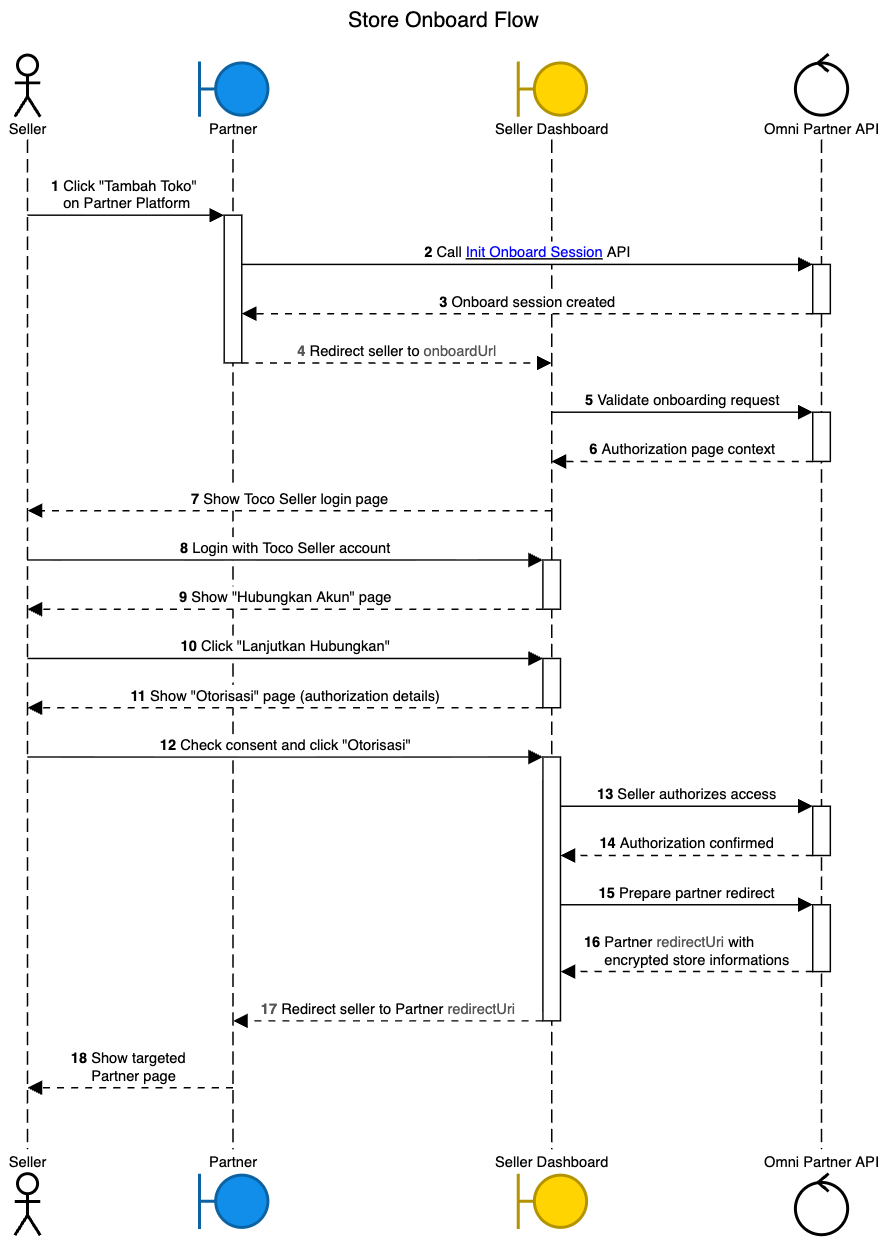
- The seller clicks the "Tambah Toko" button on the Omnichannel Platform to start connecting their Toco store.
- The Omnichannel Platform calls the Init Onboard Session API on the Omni Partner API, sending the redirectUri and related context.
- The Omni Partner API creates an onboard session and returns session details, including a seller-specific onboardUrl, to the Omnichannel Platform.
- The Omnichannel Platform redirects the seller’s browser to the onboardUrl hosted on the Toco Seller Dashboard.
- The Seller Dashboard sends a request to the Omni Partner API to validate the onboarding request and associated token.
- The Omni Partner API validates the request and returns authorization page context (such as partner and store information) to the Seller Dashboard.
- The Seller Dashboard displays the Toco Seller login page to the seller.
- The seller logs in using their Toco Seller account credentials.
- After successful login, the Seller Dashboard shows the "Hubungkan Akun" page so the seller can review store details and select the authorization period.
- The seller reviews the information on the "Hubungkan Akun" page and clicks "Lanjutkan Hubungkan" to proceed.
- The Seller Dashboard displays the "Otorisasi" page summarizing the access and permissions that will be granted to the Omnichannel Platform.
- The seller reviews the authorization details, checks the consent checkbox, and clicks "Otorisasi" to confirm.
- The Seller Dashboard sends a request to the Omni Partner API indicating that the seller has authorized access for the Omnichannel Platform.
- The Omni Partner API validates the authorization, records the grant, and responds with an authorization confirmation to the Seller Dashboard.
- The Seller Dashboard requests the Omni Partner API to prepare the final redirect back to the Omnichannel Platform.
- The Omni Partner API generates the partner redirectUri containing an encrypted store access payload and returns it to the Seller Dashboard.
- The Seller Dashboard redirects the seller’s browser to the partner redirectUri on the Omnichannel Platform.
- The Omnichannel Platform processes the encrypted store information and displays the targeted partner page (for example, a store-connected success screen) to the seller.
#
How it works
Init Onboard Session (backend-to-backend)
The Omnichannel Platform callsPOST /partner/onboard/sessionswith aredirectUri(HTTPS URL on the partner side).
Toco creates an onboarding session and returns a seller-specificonboardUrl.Credentials are never returned in this response.
Credential issuance (after seller consent)
Once the seller logs in on Toco and completes the authorization screens, Toco:- Creates (or links) the store in Toco.
- Generates the store access credential (for example
clientIdandstore token). - Encrypts the credential using the partner’s configured
encryption_key.
Credential delivery modes
- If the partner has a webhook registered:
- Toco sends the encrypted store credentials to the partner’s webhook, and
- Redirects the seller back to the partner
redirectUri, including store information and the encrypted credential in the query string.
- If the partner does not have a webhook:
- Toco only redirects the seller back to the partner
redirectUriwith the store information and encrypted credential in the query string.
- Toco only redirects the seller back to the partner
- If the partner has a webhook registered:
Store + credential lifecycle
- The onboarding + grant-access flow is effectively one-time per active store — the same Toco store cannot be registered again while its store record is still active.
- To obtain a new credential for the same store (re-consent / rotation), the store must first be unbound via the Toco Seller Dashboard or the partner dashboard; only then can the onboarding flow be run again.
- The partner
redirectUrimust:- Be a valid HTTPS URL owned by the partner, and
- Handle
sidandstoreAccessquery parameters and persist the decrypted credentials on the partner’s backend.
#
Redirect URL example
If you send the following in POST /partner/onboard/sessions:
{
  "redirectUri": "https://admin.desty.one/login/email-login?redirect=/shopset/toco"
}
After the seller completes onboarding and access is granted, Toco will redirect the seller to a URL like:
https://admin.desty.one/login/email-login?redirect=/shopset/toco&sid=b7691d02-ed51-4ff0-990f-a1ef4217a2e5&storeAccess=ENCRYPTED:gsCMXIrp4CIU4+WnMyErUEdwjNOisUJYJPgiPbREEnAMor9OQr0rQLs8COt92mDT9NE0lHrfsIe0y5M6EZTMkwEU6xtXfwDNYk1yodwV5tcSyTK8wFowMJ1reptwNCqSdgirLVwN+Ga8rStnpBaN69UhXhBpI6+eD4LEljt6zSupoQn6tz1pGSxKn082HgRZJeOb8Ts9M1xXWIDwMNwW8pbJ3XY+Gz3LCROZx2z4gdDSYPdUAaorh5w67T34gZWuTRdArw8G0cTvKAUzukEW9xq/B6+O0uIz1YeQtpZLjSXqQIaKNtAMSNSUiB5+uVLQA/R73pZoVCEprSi7a4fB+kfsDsNzPJRAgC4Yp+dgjhcpI8CFVR9sTO3q79xgkKXwdfvEqOyNP1kvVIlU8qkxW0JKqV4EWEGgatcyLPw2tHuWrLYYAkstDt1ViB/2Z5nUzYLNfeOaInZbAILVZksxoTe5jTcLYJ48bWOjIGKASzy3v8NTnWRHKPFkpzxMTR7Hbwc=
Where:
sidis the onboarding session identifier.storeAccessis the URL-encoded encrypted store credential, starting with the ENCRYPTED: prefix before URL encoding.
Example of decrypted storeAccess
After you URL-decode storeAccess and decrypt it using your configured encryption_key, you can expect a JSON payload similar to:
{
  "clientId": "str_bG7SUfKOqSQt",
  "name": "lopiop43099fdkj",
  "avatarUrl": "https://toco-img.azureedge.net/toco/665d6e1a-ad25-452b-9819-e078087108ae-9c4b49e1-6afe-4296-a3fa-d176fc68f28a-hl_image_picker_20250530014414473.jpg",
  "storeUrl": "https://web-staging.tocobagus.net/store/lopiop43099fdkj",
  "token": "stkn_xNeNeuqg0XlrzHAh",
  "expiresAt": "2026-01-12T00:00:00.000Z"
}
Notes
The onboarding + grant-access flow is effectively one-time per store:
the same Toco store cannot be registered again while its store record is still active.To obtain a new store credential for the same store (e.g. “re-consent” / rotation), the store must first be unbound the authorization from Toco via the Toco seller dashboard or Partner dashboard. Only then can the onboarding flow be run again successfully.
The
redirectUrimust:Be a valid HTTPS URL owned by the partner, and
Handle the
sidandstoreAccessquery parameters and persist the decrypted credentials on the partner’s backend.
meta
{
  "diagram": "static/flows/1-onboard/sequence.png",
  "explanation": [
    "Partner calls Init Session with redirectUri.",
    "Seller logs in, grants access.",
    "Toco issues encrypted credential and redirects."
  ]
}